MoE LLM Tuning for High RAM Low VRAM Setups
I’ve had success getting a Mixture of Experts (MoE) model running on my desktop setup. What’s impressive is that the model makes use of both my RAM and VRAM, allowing for larger models than I would otherwise be able to run. Here are some of my notes about tuning it. It’s a bit of a dry post, so use it mainly as reference.
Introduction to MoE
The idea of MoE is conditional computation. Using this, the bulk of the model can run on the CPU (!), while the attention step is handled purely by the GPU. This might sound bizarre: aren’t CPUs horrible at running parallel tasks? They are, but they can scrape by with significantly smaller parameter counts. So here’s where the experts come in: they can pretend to be a larger model by being a bunch of smaller expert models in a trench coat. The Google Gemma 4 model with 26B parameters I can run on my meager GPU is actually 128 178M “expert” models.
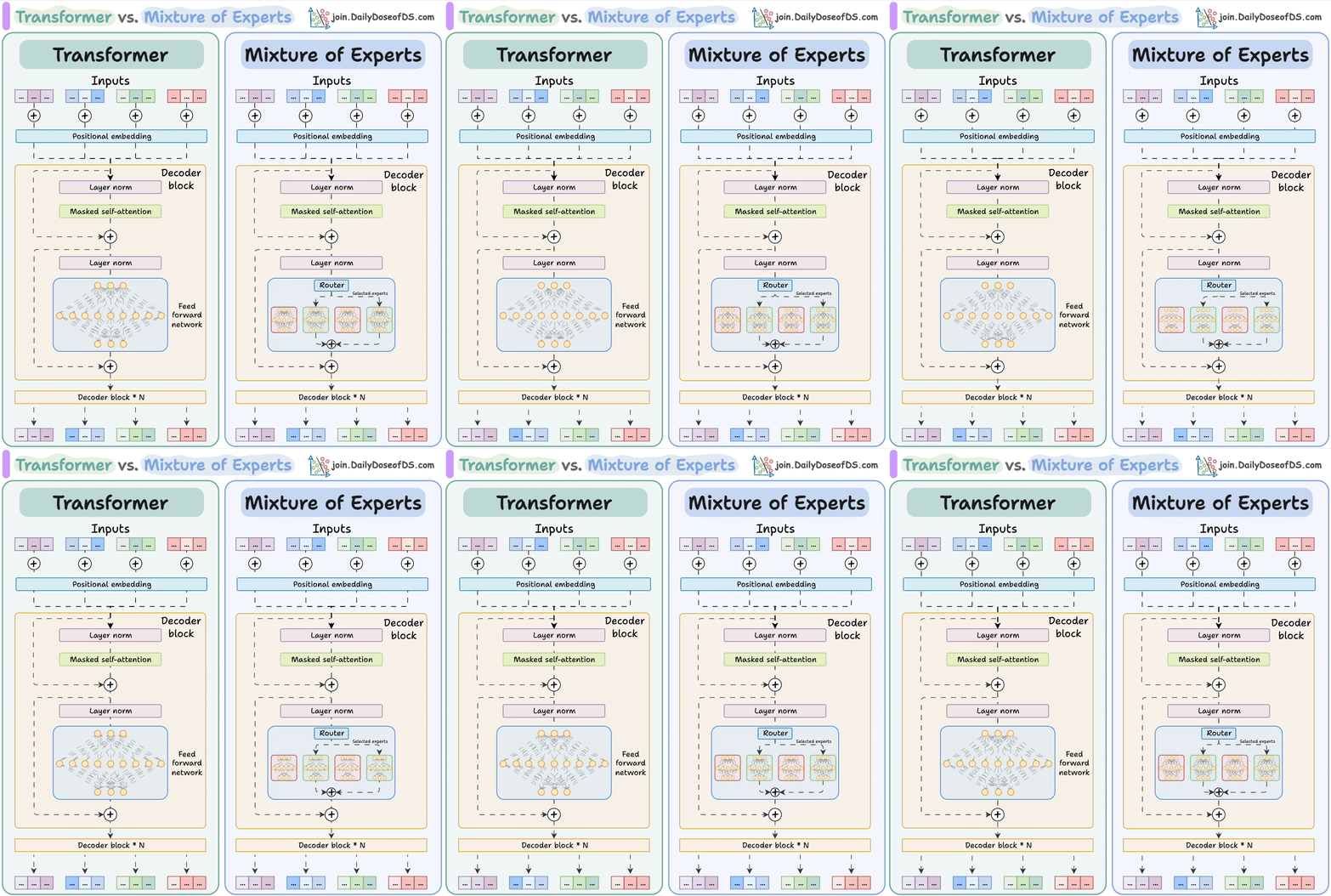 The important part is how the FFN is replaced by mini-FFNs (the experts!) Image Source
Still, running 128 models with 178M parameters every token is still the same as running one $128*178M = 22.8B$ model, so if breaking the model down was all we did we would get no gains in compute. This is where the architecture shines. The reason these smaller models are called experts is because they are highly tuned for specific contexts. Asking a model to generate Python code might have it decide that expert #114 is the one to call. The expertise of each expert is developed through unsupervised learning, so there likely aren’t easy labels for what these experts specialize in. The router (also in the diagram) in Gemma 4 picks 8 experts per token for a parameter count of $8*178M=1.4B$, and the output token is a linear combination of the experts’ output (with weights coming from the router again). This 1.4B “aggregate model” can easily be handled by a CPU.
This setup is quite flexible: there are ${128 \choose 8} = 1,429,702,652,400$ ways to choose experts, which allows them to do reasonably well in general tasks despite being “specialists”. They are trained to be used in conjunction with 7 other experts.
Configuration
If you’re like me and have a lot more RAM than VRAM, then VRAM will be your most constrained resource. You will split it among these things:
- KV cache
- The attention model
- The expert model
- Batch size
KV Cache
This is the stored meaning of your context so far. Typically, for a given context size $n$ with cached KV (the numerical meaning for each token), computing the KV of an appended token is $O(n+c)$, as the meaning is a function of the meaning of everything before it. The $c$ here is the time it takes to run 1 token through the full model, which is the same regardless of the token. If we don’t have a KV cache (like at the start of the chatlog when a user first says something), we need to cascadingly build up the meaning token by token, performing $n$ $O(n+c)$ operations for a time complexity of $O(n^2+cn)$. Needless to say, caching these values is important and provides huge performance gains.
You need VRAM to store these cached values. More VRAM means larger context, as the KV cache size depends on how many tokens you’re storing the meaning of (the context size), and how well you are storing those meanings (k- and v-quantization). If you like giving your LLM tools, they usually need lots of context to be used effectively. If you like dumping massive files and letting the LLM sort through it, you also need context to make sure it can actually see it all. If you want to reduce the KV cache size without reducing context, you might benefit from manipulating quantization.
In llama.cpp, context size is controlled by -c, and cache quantization is controlled by -ctk and -ctv for k and v respectively. To quantize cache, --flash-attn on needs to be on.
Attention Model
The attention model for a given MoE model is fixed in size. Every part of the model except the experts are dense, meaning that there’s none of that modularity, so you just have to compute it all with no workarounds. This is why this ideally lives in the GPU. Of the 3.8B “active” parameters in Gemma 4 (hence the A4B), 1.4B is taken up by the experts as previously discussed. Thus, the rest of the 2.4B should live on the GPU. It’s technically possible to offload some of the layers to the CPU, but it defeats the reason for using the MoE architecture in the first place and forces the CPU to run dense neural networks, slowing down inference. Try to fit it all in.
In llama.cpp, the number of layers on the GPU is controlled by -ngl. This will attempt to store the entire model on the GPU if you do not set some MoE config as well. If you do set an MoE parameter (as shown in the next section), setting -ngl 99 will load everything except the experts on the GPU as desired.
Expert Model
This is what is computed by the CPU on host RAM. Like mentioned earlier, while the aggregation of all the experts is large, since only a few expert models are being computed per token the CPU can handle it. However, you actually can speed this up by having the GPU compute some layers of the model. This works by moving the weights of the first N layers of all the experts to VRAM, and starting the computation before handing off its intermediate results to the CPU, making it compute the rest of the layers. This “intermediate result” is just the activation values for nodes in the neural network, so its small enough that your PCIe or RAM bandwidth won’t even get close to saturated. Moving only 1 or 2 layers didn’t really have too much of an impact for me, but results may vary with larger portions. Naturally, the downside is that even a few layers will take a massive amount of VRAM.
In llama.cpp, expert layers can all be assigned to the CPU with the --cpu-moe flag, or a the first N layers can be assigned to the CPU with --n-cpu-moe N.
Batch Size
Batch size is somewhat confusing. Lets consider the case when the user has submitted a prompt. There is already a chatlog so there’s already a KV cache, so the KV of the submitted text needs to be computed, after which new text will be generated. This step is called prefill. If your prefill is poorly optimized, you will have to wait longer after every prompt for text to even begin generating. This is its way of “understanding” the prompt. The way this works is that the CPU loads a batch of tokens each pass onto the GPU’s VRAM from the system RAM, the GPU runs the model layer-by-layer for all tokens in parallel, and adds the results to the KV cache, after which a new batch is loaded. To facilitate this, extra VRAM is needed to store intermediate results. We can process these tokens in parallel because the calculated KVs we need to cache don’t depend on each other. Note that by the “whole model” we do mean the experts, though the model is loaded layer-by-layer to fit into VRAM. While loading the expert model like this sounds like horrible IO optimization, remember that we are batching: instead of this happening for just 1 token, we are doing this for hundreds or thousands of tokens at the same time, so the stronger parallel compute power of the GPU more than makes up for the IO latency. Storing intermediate layer results takes up space in VRAM, and is linear with regards to batch size, so this is the “cost” of increasing it.
In llama.cpp, you have 2 batch size configurations, logical batch size (-b) and physical batch size (-ub). Logical batch size is the number of tokens sent to each decode pass in the software, while physical batch size is how many tokens to actually make it onto the GPU each time. The defaults are -b 2048 -ub 512, meaning that 2048 tokens are processed per software pass, but 512 tokens at a time are processed in parallel on the GPU. It would take 4 physical batches to clear 1 logical batch. Only increasing -ub should provide a performance improvement.
I found that increasing -ub significantly increases prefill speed at the cost of decent VRAM usage. If you find your model taking too long to start answering, increasing this might provide a massive speedup. Make sure that your logical batch size is a multiple of your physical batch size so the GPU is optimal with its passes.
Further Reading
- Performant local mixture-of-experts CPU inference with GPU acceleration in llama.cpp - some of the flags may be outdated